Upgrading an application design
The upgrade feature allows an application design to be replaced by a new version.
You many want to make significant changes to your application but do not want to affect the running version while you finalize the details. If you create a copy of the application, using export and import, you can make and test all changes. The copy can be edited, deployed, and records submitted without affecting the original application. Once you have completed the changes on the application copy, you can upgrade the original app with the export of the copy. The original app will maintain its application identification, but will also contain all the changes from the copy.
-
Export an existing application:
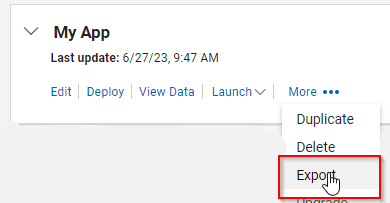
Select a local directory where the application file will stored.
-
Select New Application > From Existing > Next.
-
Choose the application from your local directory and click Create.
Note
The imported application will have the same name as the original - edit the name to distinguish it from the original. It is also recommended that you change the access permissions so that others may not use the application while it is in development.
-
Edit the new application to work on the next iteration of the app. This can be deployed and tested, without interfering with the original application.
-
When satisfied, Export the new application (without data):
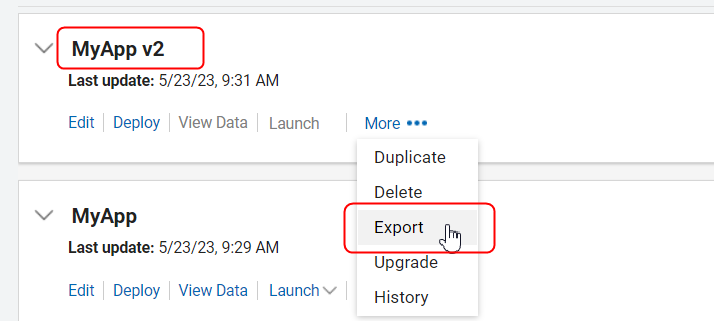
-
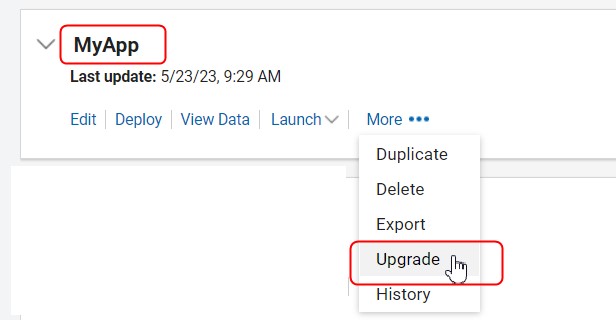
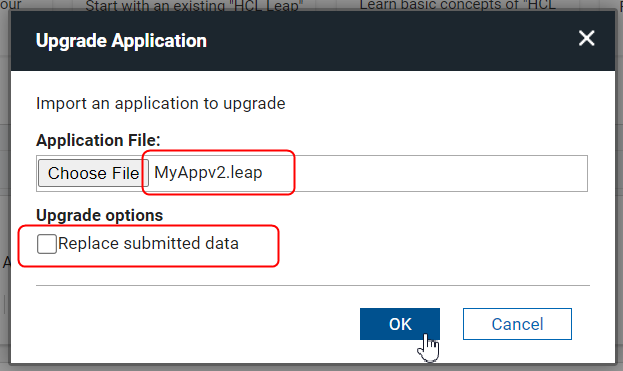
In the original application, select Upgrade and choose the exported new application (ex. MyApp v2).
Note
Do not check Replace submitted data.
-
This will result in the older app (MyApp) being upgraded to the newer version. Decide if you are going to keep the copy for further future edits or delete it.
Additional Upgrade Options
New options have been added to change how the upgrade procedure modifies the existing application.
Preserve existing application name - The application name is not updated.
Preserve existing application description - The application description is not updated.
Preserve existing role members
-
Members in existing roles (in the existing application) are not changed
-
Any new roles in the upgrade app are added to the existing app, along with their corresponding members.
-
Any roles removed in the upgrade app are also removed from the existing app.
-
Any new roles added to the existing app after the export, and not present in the upgrade file, are removed.
Parent topic: Application Management